


What is a robots.txt file and why does it matter for your site?
Not every page on your website needs to show up in Google. Admin panels, internal search results, test pages, these are things you'd rather keep out of search indexes. That's exactly what a robots.txt file is for.
What is robots.txt?
The robots.txt file is a small text file that lives in the root of your website. You can find it at yourdomain.com/robots.txt. Search engines like Google read this file automatically when they visit your site. Based on the rules inside, they decide which pages to crawl and which to skip.
Crawling means a search engine visits your page, reads the content, and stores it in its index. Pages in the index can appear in search results. Pages blocked by robots.txt are generally ignored by crawlers.
What does a robots.txt file look like?
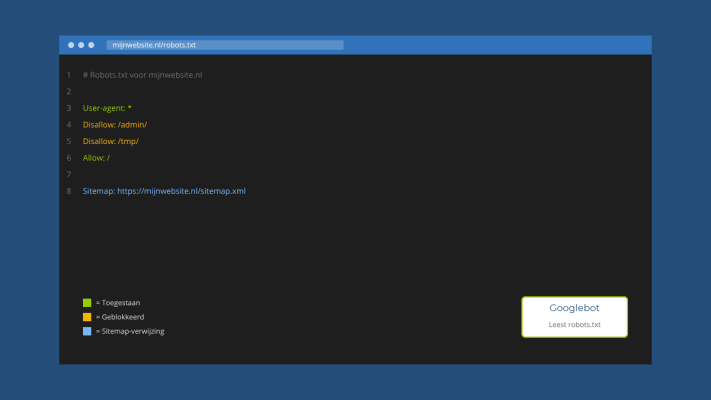
The structure is pretty simple. A basic example includes rules like these:
- User-agent: * means the rule applies to all search engines
- Disallow: /admin/ blocks your admin area from being crawled
- Allow: / opens up everything else on your site
- Sitemap: you can also include your sitemap URL here
You can add multiple rules and even give specific instructions to individual search engines, allowing you to treat Google differently from Bing, for example.
What should you block and what should you leave open?
This is where things sometimes go wrong. Pages you typically want to block include admin areas, login pages, internal search results, and staging or test environments. Pages you should not block include your homepage, blog posts, product pages, and your contact page.
A common mistake is accidentally blocking CSS or JavaScript files. Google needs those to properly render and evaluate your pages. If they're blocked, it can quietly hurt your rankings without you realizing it.
Robots.txt is not a security tool
This is worth spelling out clearly. A robots.txt file is a request, not a rule. Well-behaved crawlers like Google follow it. Malicious bots and scrapers usually don't. If you actually need to protect a page, you need a password or proper access control, not just a robots.txt entry.
Does robots.txt work together with your sitemap?
Yes, and combining them is a smart move. We've written before about what a sitemap is and how it helps Google understand your site better. You can include your sitemap URL at the bottom of your robots.txt file, making it easier for search engines to find and prioritize the pages you want indexed.
How do you check if your robots.txt is working correctly?
Google Search Console has a built-in robots.txt tester. You can use it to see exactly which pages are blocked or allowed based on your current file. It's especially useful if you suspect certain pages aren't being indexed when they should be.
Need help setting up your robots.txt file, your sitemap, or anything else related to how search engines see your site? Feel free to reach out, I'm happy to take a look.
Rather have it done than figure it out yourself?
I help businesses in Groningen, across the Netherlands and abroad with exactly this kind of question. Tell me briefly what you need and you will hear back within one working day.
Continue reading