


Core Web Vitals explained: what do they mean for your website?
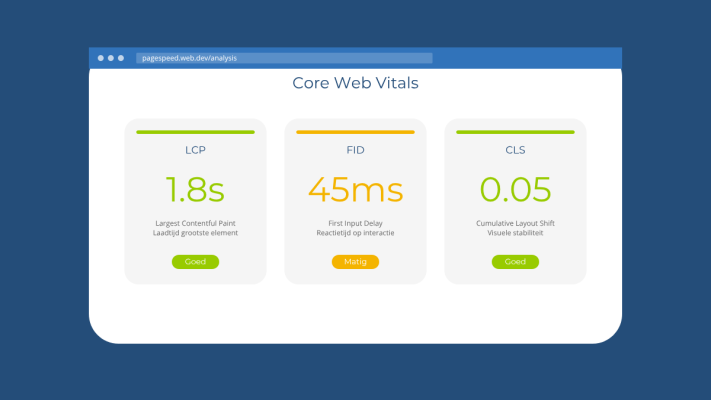
If you have ever run your website through Google PageSpeed Insights or Lighthouse, you have probably seen these abbreviations pop up: LCP, INP and CLS. These are what Google calls Core Web Vitals. It sounds technical, but the idea behind them is actually pretty straightforward.
What are Core Web Vitals?
Core Web Vitals are three metrics Google uses to measure how pleasant your website feels to use. They are part of a broader set of signals that influence your position in search results. Not the only thing that matters, but definitely not something to ignore.
LCP - Largest Contentful Paint
This measures how quickly the largest visible element on your page has loaded. Think of a big hero image at the top of your homepage or a prominent heading. Google wants this under 2.5 seconds. Take longer and a portion of your visitors will already be gone before they have seen anything.
INP - Interaction to Next Paint
INP measures how quickly your site responds when someone clicks or taps something. Press a button and there is a noticeable delay before anything happens? Your INP is too high. Anything under 200 milliseconds is considered good. This metric replaced the older FID in 2024.
CLS - Cumulative Layout Shift
This is the score for visual stability. You know that frustrating moment when you are about to click a button and the page suddenly jumps because an image or ad is still loading? That is a high CLS score. Google wants this below 0.1.
What does this mean for your website in practice?
Poor Core Web Vitals have two direct consequences. First, visitors who leave because your site feels slow or unstable. Second, a lower position in Google compared to competitors who have it sorted. We have written before about how website speed directly affects your revenue, and Core Web Vitals are a big part of that.
The good news is that you do not always need a major technical overhaul. A lot of improvement can come from a few focused changes.
Practical tips to improve your scores
- Use optimised images in modern formats like WebP. Large, uncompressed images are often the biggest culprit behind a poor LCP score.
- Load fonts and scripts smartly. Make sure what the user sees first is also loaded first, and defer everything else.
- Reserve space for images and ads in your HTML and CSS. This prevents the page from jumping around while things are still loading.
- Minimise heavy JavaScript. Plugins and scripts that require a lot of processing can push your INP score up significantly.
- Use a solid hosting environment. A slow server will undermine every other optimisation you make.
How do you check your scores?
The easiest way is through Google's PageSpeed Insights. Enter your URL and you immediately get an overview of how you score on mobile and desktop, along with concrete suggestions. Google Search Console also shows field data based on real users, which is more valuable than a lab test alone.
Core Web Vitals are not rocket science, but they do require attention. Especially if you rely on organic traffic from Google, it is worth checking these scores regularly. It is one of those things visitors do not notice when they are good, but they definitely feel them when they are not.
Rather have it done than figure it out yourself?
I help businesses in Groningen, across the Netherlands and abroad with exactly this kind of question. Tell me briefly what you need and you will hear back within one working day.
Continue reading