


Internal links: how to strengthen your website in Google without ad spend
What are internal links exactly?
An internal link is simply a link from one page on your website to another page on the same website. Think of a blog post linking to your services page, or a product page pointing to a frequently asked question. It sounds straightforward, and it is. But the impact on your search visibility is bigger than most people realise.
Why Google pays close attention to them
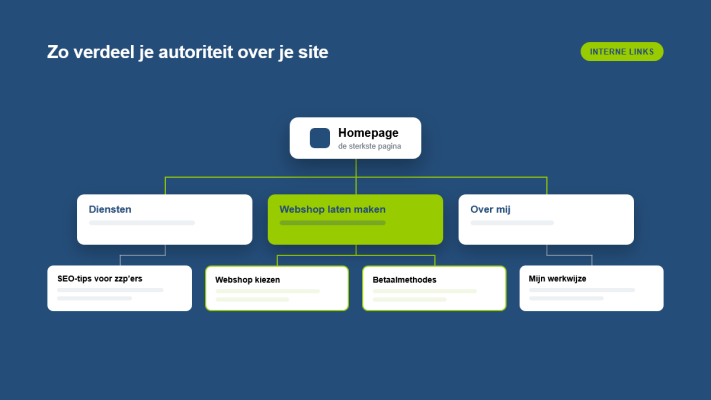
Google uses internal links to understand how your website is structured. Which pages are important? What is the logical hierarchy? When multiple pages on your site link to one specific page, it signals to Google that this page holds value. That helps it rank higher in search results.
Internal links also help distribute the link authority you build through external websites across your own pages. This means more of your pages benefit from your overall SEO efforts.
Practical tips to get started right away
1. Link from blog posts to your services
If your blog posts cover topics related to what you do, link from those posts to relevant pages. Writing about technical SEO? A link to your services page fits naturally. Visitors learn what you offer, and Google understands the connection.
2. Use descriptive anchor text
The clickable text in a link is called anchor text. Never use phrases like "click here". Instead, tell the reader what they can expect, such as "read more about website maintenance" or "see how I work". This helps Google understand what the target page is about.
3. Go back and update older content
Already have a few blog posts published? Review them and look for opportunities to add links to newer posts. A good example is my earlier post on what a sitemap is and why it helps Google understand your site, which connects naturally to this topic.
4. Build a logical structure
Think of your website as a tree. The homepage is the trunk, the main pages are the branches and blog posts are the leaves. Good internal linking follows that logic. Pages closer to the homepage are seen by Google as more important.
5. Do not overdo it
More is not always better. A page packed with links is confusing for the reader and gives Google less clarity. Stick to links that are genuinely relevant and helpful. Two or three well-placed links per page is usually enough.
Combine internal links with other SEO techniques
Internal links work best alongside other elements. Structured data, for example, can help you stand out in search results, as I covered in structured data: how to stand out in Google search results. A fast-loading website also makes a real difference, which I wrote about in why website speed directly affects your revenue.
Small business, real impact
The great thing about internal links is that they cost nothing. No ad budget, no agency to hire. Just a bit of time and a thoughtful approach. For freelancers and small business owners, this is exactly the kind of SEO you can handle yourself. Want to know how your website is doing right now or need help with the structure? Feel free to get in touch, I am happy to take a look with you.
Rather have it done than figure it out yourself?
I help businesses in Groningen, across the Netherlands and abroad with exactly this kind of question. Tell me briefly what you need and you will hear back within one working day.